

@axl is a UPI handle suffix that belongs to Axis Bank. PhonePe uses it as one of its partner bank handles.
You do not need an Axis Bank account to get an @axl UPI ID. PhonePe assigns it to help payments go through without failure.
This article covers what @axl means, why it shows up on your app, whether it is safe, and how to manage it.
Understanding The Meaning And Role of AXL in UPI
To understand @axl, you first need to know how UPI handles work and why apps use different bank suffixes.
UPI runs on two layers. The first is the app you use, PhonePe or Google Pay. These are called TPAPs (Third-Party Application Providers). The second layer is the PSP bank (Payment Service Provider bank).
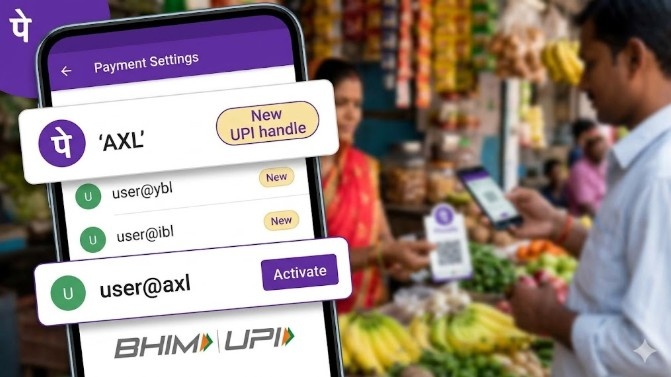
This bank sits behind the app and processes your transactions. PhonePe uses Axis Bank as one of its PSP banks. That is where @axl comes from.
Here is a look at some common UPI handles and the banks behind them:
| UPI Suffix | Partner Bank | Primary App |
|---|---|---|
| @axl | Axis Bank | PhonePe |
| @ybl | YES Bank | PhonePe |
| @ibl | ICICI Bank | PhonePe / Google Pay |
| @okaxis | Axis Bank | Google Pay |
Many people mix up the PSP bank with their personal bank. These are two different things. Your money stays in your own bank, SBI, HDFC, or wherever you hold your account.
The @axl suffix only tells the UPI system which bank server should process the payment. It works like a routing code.
This is why the search “axl in upi sbi” is common; even SBI account holders can have an @axl UPI ID through PhonePe. You can read more about how UPI IDs work on our UPI ID guide.
Why Does My PhonePe Show AXL in UPI?
If PhonePe asked you to “Activate @axl,” or if you noticed your UPI ID ends in @axl, nothing is wrong. PhonePe uses a multi-bank model, which runs on more than one PSP bank at a time.
Here is what that means for you:
- Redundancy:
PhonePe’s original default handle is @ybl, tied to YES Bank. When YES Bank servers go down or slow down, PhonePe routes your payment through @axl instead. Your payment still goes through.
- Load balancing:
On busy days like sale seasons or month-end, millions of payments hit UPI at the same time. Spreading that load across @axl, @ybl, and @ibl cuts down the number of “Technical Decline” errors you see.
- Auto-activation:
PhonePe asks users to activate @axl because more active handles give the app more options. It can pick the best route at the time of payment. More handles means fewer failed payments.
So when people ask “axl upi id which app” the answer is PhonePe. Axis Bank also has its own handles like @axisb and @okaxis, but those work on different platforms.
Is AXL in UPI Safe for Transactions?
Yes, @axl is safe. NPCI (National Payments Corporation of India) has registered @axl as an official UPI handle. It follows the same rules as every other UPI handle in the country.
Every payment needs your UPI PIN. That PIN acts as a second layer of check before any money moves.
The axl in upi meaning is only technical. It tells the system which bank server to use. It has no effect on how safe your transaction is.
One thing to keep in mind no UPI handle keeps you safe if you share your UPI PIN or tap “Pay” on a request you did not start. Scams on UPI work by getting users to take the wrong action.
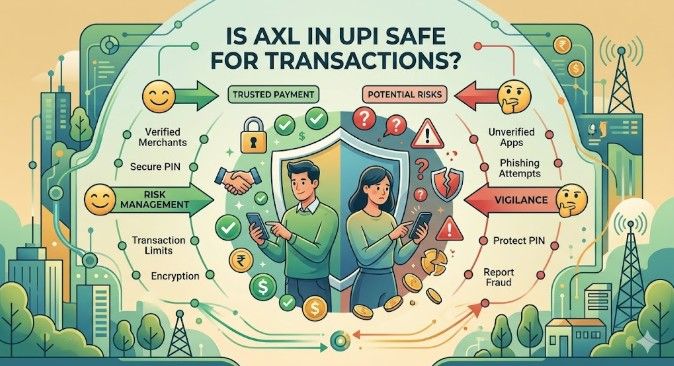
The handle does not matter in those cases. Whether you see @axl, @ybl, or @ibl, the rule stays the same: do not share your PIN, and do not approve requests from people you do not know.
Read more about how UPI rules protect you on our UPI new rules page.
How to Manage or Change AXL in UPI Handles
PhonePe lets you see and control which UPI handles are active on your account. Follow these steps:
- Open PhonePe and tap your Profile icon at the top left.
- Go to Payment Settings, then tap UPI IDs.
- You will see all your handles @axl, @ybl, @ibl, or others.
- From here, tap Activate to turn one on, or Delete to remove one.
Most users do well keeping @axl active along with @ybl. The table below shows what you get from that.
| Feature | Benefit to User |
|---|---|
| High Success Rate | Fewer “Payment Pending” or “Failed” messages |
| Server Switching | App picks a working bank server on its own |
| NPCI Compliance | Transactions follow all UPI rules and checks |
Keeping more than one UPI handle active costs nothing. PhonePe does the switching on its own. You do not have to do anything extra.
Technical Comparison: AXL vs. Other UPI Suffixes
If you use PhonePe, you may have more than one UPI handle on your account. Here is a look at how the main ones compare.
| Handle | Bank Partner | Best For |
|---|---|---|
| @axl | Axis Bank | Handling high transaction volume |
| @ybl | YES Bank | Users who have had PhonePe for a long time |
| @ibl | ICICI Bank | Backup when other servers are busy |
Does one handle pay faster than another? In most cases, no. The time a payment takes does not change much across handles. What changes is the success rate.
Axis Bank servers handle busy periods well, which is why PhonePe pushes users to activate @axl. The @ibl handle ibl in UPI backed by ICICI Bank, works as a third option when the other two are busy.
A few handles cause confusion. @axisb upi and bhim axis pay upi are not the same as @axl. @axisb comes from Axis Bank’s own app, the BHIM Axis Pay UPI app. @axl belongs to PhonePe’s backend only.
The same goes for ptaxis upi and okbizaxis upi. These are separate handles for business or Google Pay transactions. And yes, okbizaxis upi is real, it is for business payments through Google Pay.
If a payment fails or something goes wrong, you can raise an Axis Bank UPI complaint through the NPCI portal or PhonePe’s help section. Our GST on UPI transactions guide covers any charges that may apply.
Conclusion: @axl Is Axis Bank Working Behind PhonePe
@axl is the Axis Bank handle that PhonePe uses to keep your payments moving. It is not a separate account. It is not a risk. It is part of how PhonePe makes sure your payment finds a working path.
It does not matter if you bank with SBI, HDFC, or any other bank. Having @axl active on PhonePe just means your transactions have more than one route to take.
Turn it on, leave it on, and let PhonePe handle the rest. For most users, it is the simplest way to cut down on failed payments.
FAQs
@axl belongs to Axis Bank. PhonePe uses it as a PSP bank handle to process UPI transactions. It is not connected to your personal bank account.
PhonePe uses @axl. It sits alongside @ybl (YES Bank) and @ibl (ICICI Bank) on the platform. Together, they help PhonePe keep payment success rates up.
Axis Bank has more than one UPI handle. PhonePe uses @axl, Google Pay uses @okaxis, the BHIM Axis Pay UPI app uses @axisb, and business accounts use @okbizaxis.
It means PhonePe is routing your payment through Axis Bank’s server. It is a backend handle. It has no effect on which bank holds your money.
An AXL payment is a UPI transaction that goes through the @axl handle. NPCI regulates it. It needs a UPI PIN and works the same way as any other UPI payment.