

Your credit card billing date is printed on every monthly statement, visible in your bank’s mobile app under the credit card section, and available through net banking.
It is the date your bank closes the billing cycle and generates your statement. Knowing this date helps you time payments, avoid interest, and manage your finances better. This article covers how to find it, understand it, and use it to your advantage.
What Is a Credit Card Billing Date?
A credit card billing date is the specific day each month when your bank ends the current billing cycle and generates your credit card statement. Every purchase, payment, and fee recorded during that cycle appears on the statement issued on this date.
This date is different from your due date. The billing date closes the cycle. The due date is the deadline by which you must pay the amount shown on the statement.
Most banks in India set the billing cycle at 28 to 31 days. Once your card is issued, the bank assigns a billing date automatically. You will see it on your first statement itself.
Here is a quick comparison to avoid confusion:
| Feature | Billing Date | Due Date |
|---|---|---|
| Meaning | Statement generation date | Payment deadline |
| Purpose | Ends billing cycle | Payment of dues |
| Gap | Marks the start of the grace period | Usually 15–25 days after billing |
Understanding this difference is essential. If you confuse the two, you might miss the payment window and end up paying interest or late fees.
Where to Find Your Credit Card Billing Date
There are several simple ways to check your billing date. You do not need to visit a bank branch for this.
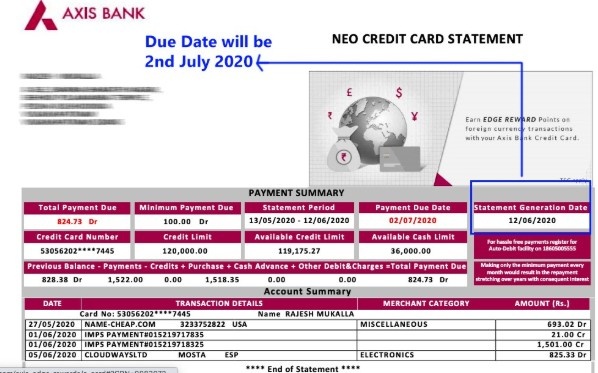
Your monthly credit card statement is the most reliable source. The billing date, due date, minimum amount due, and total outstanding are all clearly printed on the statement header. Banks send this via email, SMS, or postal mail, depending on your preferences.
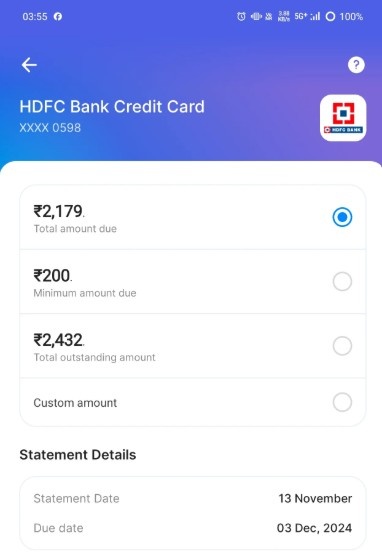
Your bank’s mobile app is the fastest option. Most major banks, including SBI, HDFC, ICICI, and Axis, display the billing date prominently under the credit card section. Open the app, navigate to your credit card, and look under “Statement” or “Billing Cycle.”
Net banking portals also show this information. Log in, go to the credit card summary page, and you will find the billing date alongside other key details.
If you cannot find the billing date through any of these, call your bank’s customer care number. The representative can confirm your billing date and due date within minutes. Some banks also include the billing date in email or SMS alerts sent at the start of each cycle.
How to Check Billing Date on Bank Apps and Statements
Each platform presents the billing date in a slightly different location. Here is a quick reference:
| Platform | Where to Find Billing Date |
|---|---|
| Mobile App | Credit Card → Statement → Billing Cycle |
| Net Banking | Credit Card Summary Page |
| PDF Statement | Top header section |
On your bank’s mobile app, start by selecting your credit card from the accounts list. Tap on “Statements” or “Card Details.” The billing date is typically displayed alongside the statement period, such as “Billing Cycle: 5th May to 4th June.”
If you use HDFC Bank’s app and want to explore more of its digital features, you can also set up a UPI ID through HDFC for faster bill payments.
In net banking, the credit card summary page lists the last statement date, upcoming due date, and current unbilled transactions. This page updates automatically after every billing cycle closes.
On your PDF statement, look at the top section. The statement date and billing period are printed right below your name and card number. The due date appears nearby, usually highlighted or boxed for visibility.
Understanding Your Billing Cycle (With Examples)
Your billing cycle is the window of time during which all transactions are recorded before a statement is generated. It typically runs for 28 to 31 days, depending on the card issuer.
Consider this example. If your billing date is the 4th of every month, your billing cycle runs from the 5th of the previous month to the 4th of the current month. Every swipe, online payment, or EMI deducted during this period will appear on the statement dated the 4th.
Transactions made after the billing date roll over into the next cycle. If you buy something on the 5th after a 4th billing date, that purchase will reflect on next month’s statement instead.
The grace period, or interest-free period, starts from the billing date and lasts until the due date. In India, most credit cards offer a grace period of 20 to 50 days, depending on when the purchase was made within the cycle.
Purchases made early in the billing cycle enjoy a longer interest-free window. A purchase on the 5th of the month, with a billing date on the 4th of next month and a due date on the 24th, gives you roughly 50 days interest-free. A purchase on the 3rd, just before the cycle closes, gives you only about 21 days.
This is why tracking your billing date matters for timing large purchases. When you keep an eye on the transaction ID for each payment, it becomes easier to match your records with the statement.
Why Knowing Your Billing Date Matters
Knowing your billing date gives you practical control over your credit card usage. Here is why it matters.
You can avoid interest charges entirely. If you pay your full outstanding amount before the due date, no interest is applied to your purchases. The RBI mandates that billing statements must provide at least a 14-day repayment period from the date the statement is issued.
You can time large purchases wisely. Making a big purchase right after the billing date gives you the maximum interest-free period, sometimes up to 50 days.
You can plan your payments around your salary cycle. Since March 2024, the RBI has allowed cardholders to modify their billing cycle at least once to align it with their income schedule. You can request this change through your bank’s app, helpline, or net banking.
It helps you set up auto-pay correctly. If you use UPI or net banking to automate your credit card payments, knowing the billing and due dates ensures the debit happens at the right time. If you prefer paying via UPI and do not have a debit card linked, you can still create a UPI ID without a debit card and use it for bill payments.
Staying on top of these dates also protects your credit score. Even one missed payment is reported to credit bureaus and can lower your score.
What to Do If You Can’t Find Your Billing Date
If you are unable to locate your billing date through your app, statement, or net banking, here are a few quick steps.
- Call your bank’s credit card customer care number. This is printed on the back of your card. The representative will confirm your billing date, due date, and outstanding balance.
- Send an SMS or email request to your bank. Most banks support this for basic account queries. Check your bank’s website for the correct format.
- Visit the nearest bank branch with your credit card and photo ID. The staff can print a copy of your latest statement and confirm your billing cycle.
- If your payment failed due to incorrect timing, do not panic. Payment failures near the due date can sometimes happen due to server delays or insufficient balance.
Understanding why a transaction fails and retrying promptly can help you avoid late payment fees.
Also consider enabling SMS or email alerts for statement generation and payment reminders. Most banks offer free alerts that notify you as soon as your billing cycle closes and again a few days before the due date.
Conclusion: Check your statement or bank app to find your credit card billing date.
Your credit card billing date determines when your statement is generated and when your interest-free period begins.
Knowing this date helps you plan purchases, avoid interest charges, and align payments with your salary cycle.
Check it through your bank’s app, net banking, or monthly statement. If you want to change it, the RBI now allows you to modify your billing cycle at least once. Staying aware of this one date can save you money every month.
FAQs
No. The billing date is when your bank generates the monthly statement. The due date is the deadline to pay the amount shown on that statement. The due date typically falls 15 to 25 days after the billing date.
Yes. Since March 2024, the RBI requires card issuers to let you change your billing cycle at least once. You can request this through your bank’s app, customer care, or net banking. Some banks may allow more than one change.
You will avoid late payment fees, but interest will be charged on the remaining unpaid balance. The interest rate on most credit cards in India ranges from 2.5% to 3.5% per month. Paying only the minimum amount also means you lose the interest-free grace period for the next cycle.
No. Your billing date stays the same each month unless you request a change. However, the exact number of days in a billing cycle may vary slightly between months, with 28, 30, or 31 days.
Paying a few days before the due date is ideal. This accounts for any processing delays in bank transfers or UPI payments. If you set up auto-pay, ensure a sufficient balance is available at least two days before the due date.