

You can use UPI in Singapore, but it works in two distinct ways. As a tourist, you can scan UPI-compatible merchant QR codes using Google Pay, PhonePe, or BHIM at select stores.
If you need to send money to someone in Singapore, the UPI-PayNow linkage lets you transfer funds instantly using just their mobile number. Activate UPI International first, carry backup payment options, and know where acceptance is reliable.
What Is UPI International?
UPI International is an extension of India’s Unified Payments Interface (UPI) that lets Indian users pay at select foreign merchants or send money abroad, all from their existing Indian bank account. It is managed by NPCI International Payments Limited (NIPL), a wholly owned subsidiary of the National Payments Corporation of India (NPCI).
Singapore is currently one of the most mature UPI corridors globally, with the UPI-PayNow linkage now expanded to cover 19 Indian banks, simplifying remittances for millions, particularly the Indian diaspora in Singapore.
In Singapore, UPI works through two separate mechanisms that are often confused with each other:
- UPI International QR payments, for tourists paying at physical merchant stores
- UPI-PayNow linkage, for person-to-person remittances to Singapore bank accounts
Understanding the difference will save you significant frustration on the ground.
Method 1: Paying Merchants via QR Code
Paying merchants via QR Code is the easiest way to pay in Singapore with UPI.
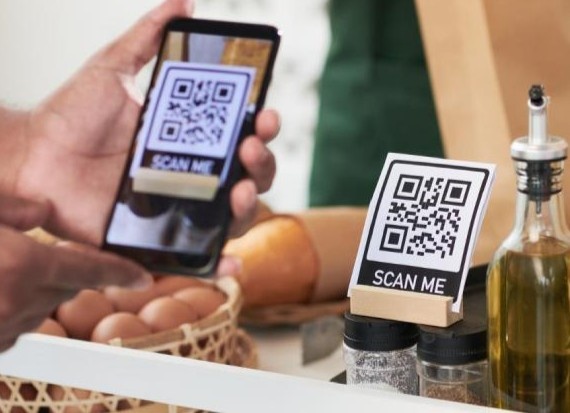
Step 1: Activate UPI International
Before you land in Singapore, activate UPI International on your app.
- Open Google Pay, PhonePe, or BHIM
- Tap “Scan QR Code” and attempt to scan any QR code
- A prompt to “Activate UPI International” will appear, tap it
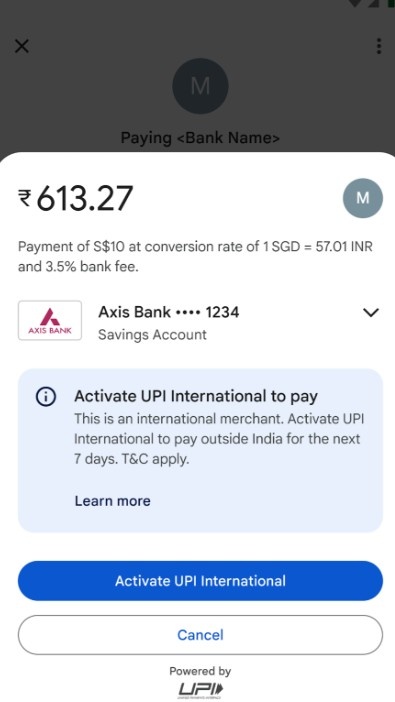
- Enter your UPI PIN to confirm
Important: UPI International activation is valid for only 7 days, but you can turn it on again after it expires. It can only be activated for bank accounts that specifically support UPI International.
Step 2: Ensure Your Bank Account Is Enabled
Not every bank account supports UPI International. Check with your bank before travel. Major supported banks include SBI, HDFC, ICICI, Axis, and Kotak Mahindra, among others.
Step 3: Scan the Merchant QR Code
- Open your UPI app and tap Scan QR
- Scan the merchant’s UPI-compatible or NETS QR code
- Enter the amount in Singapore Dollars (SGD)
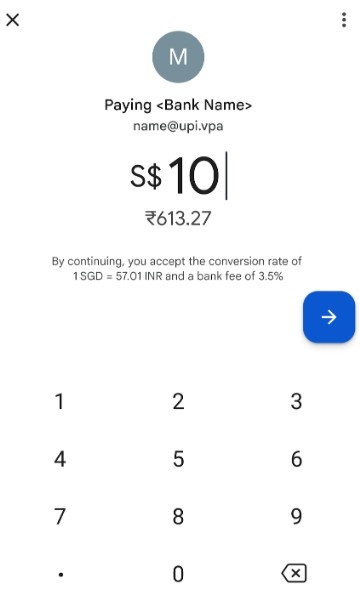
- Your app will display the equivalent amount in Indian Rupees (INR), including forex conversion fees
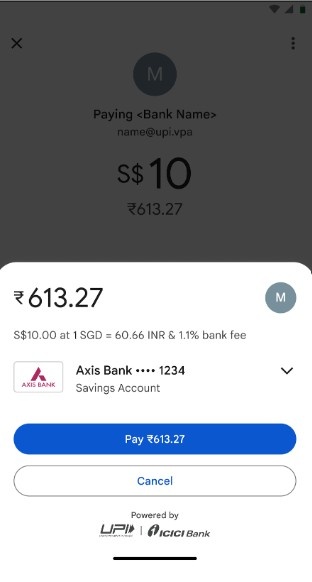
- Enter your UPI ID to complete the payment
Step 4: Deactivating UPI International
When you return to India or no longer need international payments:
- Open Google Pay → Go to Profile → Payment Methods
- Select the bank with UPI International turned on
- Tap Manage International Payments → Deactivate
- Enter your UPI PIN
Method 2: Sending Money via UPI-PayNow Linkage
The UPI-PayNow corridor lets you send money directly from your Indian bank account to a recipient’s Singapore bank account.

Transfers are completed in seconds, eliminating the need for lengthy bank codes or waiting days for traditional wire settlements.
Step 1: Log In to a Participating Bank’s App
Use a supported Indian bank app. Participating banks now include Axis Bank, HDFC Bank, ICICI Bank, SBI, Indian Bank, and 14+ others following NIPL’s 2025 expansion.
Step 2: Navigate to Foreign Outward Remittance
Look for the “Foreign Outward Remittance” section within the app. You will need to accept the terms and conditions. This is a one-time setup step.
Step 3: Enter the Recipient’s Details
- Select Singapore as the destination
- Enter the recipient’s Singapore mobile number (prefixed with +65) or their PayNow VPA (Virtual Payment Address)
- Specify the amount in INR or SGD
Step 4: Confirm and Authorize
- Review the real-time exchange rate shown before confirming
- Authorize the payment using your banking credentials or UPI PIN
- The funds are credited to the recipient’s Singapore bank account in real time.
How to Receive Funds in Singapore (for NRIs/Residents)
If someone in India is sending you money via UPI-PayNow:
- Share your Singapore mobile number registered with PayNow or your PayNow VPA with the sender in India
- The money will appear in your linked Singapore bank account almost instantly
Where UPI Works, and Where It Doesn’t
While using UPI in Singapore, you must know where it will work and where it won’t.
Where UPI Works Reliably In Singapore
Below you can see where UPI can work in Singapore:
| Location | Notes |
|---|---|
| Mustafa Centre (Little India) | UPI is accepted at most counters; staff are trained, and QR codes are properly configured, with a success rate around 85%. |
| Select Jewellery Shops, Serangoon Road | Gold shops catering to Indian customers have adopted UPI. Always ask before purchasing |
| Major tourist attraction gift shops | Generally configured for UPI acceptance |
| Select food courts | Some larger food courts (not traditional hawker stalls) |
Where UPI Typically Fails In Singapore
The table below will show you where UPI won’t work in Singapore:
| Location | Reason |
|---|---|
| Traditional Hawker Centres | Cash or local PayNow only |
| MRT / Public Transport | Does not support UPI; use an EZ-Link card or a contactless card |
| Taxis / Grab | Standard PayNow QR codes; not UPI-compatible |
| Regular retail stores | Standard PayNow QR codes are incompatible with Indian UPI apps |
The Ground Reality
Despite the ease of using UPI in Singapore, there are certain things you need to consider before relying on it:
The QR Code Compatibility Problem
The UPI-PayNow linkage exists, but it’s effectively one-directional in practice. Indian UPI apps can only scan specially formatted PayNow-UPI QR codes, not regular PayNow codes.
The problem: approximately 90% of Singapore merchants display standard PayNow QR codes that Indian UPI apps simply cannot read.
Source: Trip Cabinet
When you scan a standard PayNow QR code with PhonePe or Google Pay, one of two things typically happens: the app throws an error immediately, or it appears to proceed but then silently fails the payment.
The April 2025 Rule Change You Must Know
From April 2025, NPCI introduced new UPI rules and changed how international UPI payments work by removing the option to pay using saved or shared QR codes outside India. If you’re paying abroad, the QR code now has to be scanned live, in person. Screenshots of QR codes will no longer work.
Source: TOI
Realistic Success Rate
Tracking over 200 UPI transactions from travelers in Singapore, the overall success rate was around 87%, making Singapore one of the strongest UPI markets globally compared to other countries. However, this figure applies specifically to UPI-enabled merchants; attempting UPI at random merchants without UPI-specific QR codes will result in a much lower success rate.
Source: EaseMyTrip
Transaction Limits and Forex Charges
Using UPI in Singapore comes with certain payment limitations, as shown below:
| Type | Limit |
|---|---|
| Standard UPI International (QR merchant payment) | ₹1,00,000 per transaction |
| UPI-PayNow remittance (India to Singapore) | Up to ₹60,000 per day from India |
| Singapore to India (via PayNow) | SGD 1,000 per day |
| High-value categories (travel, insurance, etc.) | Up to ₹5 lakh per transaction, effective September 15, 2025 |
Note: While NPCI sets the overarching limits, individual banks have the discretion to impose their own, often lower, transaction limits. Always verify with your specific bank before travel.
Forex Charges
UPI International payments are not free when used abroad. Here’s what you pay:
- Your Indian bank converts SGD to INR at the time of the transaction.
- Banks convert currencies at forex rates that are higher than the mid-market rate you see on Google, so while UPI transfers can be convenient, you need to be mindful of the international transfer fee and currency exchange rate to avoid surprises.
- The total cost (conversion rate + bank fee) is displayed on screen before you enter your UPI PIN. Always review this before confirming.
- Forex charges vary by bank; check with your bank ahead of travel.
For large transfers, compare UPI-PayNow rates against alternatives like Wise, which uses the mid-market rate.
UPI Apps That Support International Payments
- Google Pay
- PhonePe
- BHIM
- Paytm
Banks Supporting UPI-PayNow Remittance (Partial List)
- State Bank of India (SBI)
- HDFC Bank
- ICICI Bank
- Axis Bank
- Indian Bank
- Bank of Baroda
- Canara Bank
- Union Bank of India
- Plus 11+ other banks added in the 2025 NIPL expansion
Always verify your bank’s current support status on the bank’s official website or app, as the list is expanding.
Troubleshooting Common UPI Failures in Singapore
While using UPI in Singapore, you might face some failures. Some of them are shown below with their likely cause and fixes.
| Problem | Likely Cause | Fix |
|---|---|---|
| “QR code not supported” error | Merchant uses standard PayNow QR, not UPI-compatible | Ask the merchant if they have a UPI-specific QR; otherwise, pay by card or cash |
| Payment appears to go through, but the money is not debited. | Silent transaction failure | Wait 2 minutes; check bank statement; do not retry immediately |
| UPI International option not appearing | Bank account not enabled for international payments | Contact your bank to activate UPI International on that account |
| Activation prompt not showing | App outdated | Update your UPI app to the latest version before traveling |
| Transaction declined after PIN entry | Daily limit exceeded or bank-side restriction | Try a different linked bank account or pay by card |
| Payment successful, but the merchant is not getting credit | Network delay | Show your transaction reference number; the amount typically settles within minutes |
Backup Payment Options In Singapore
Given the ground realities of UPI acceptance in Singapore, always travel with backups:
- International debit or credit card, Visa/Mastercard accepted almost universally
- Cash (SGD), Essential for hawker centres, traditional markets, and taxis
- GrabPay, download the Grab app, and load it with a card for seamless payments
- EZ-Link card, required for MRT and buses; pick one up at Changi Airport
A smart approach: use UPI where you know it works (Mustafa Centre, tourist shops in Little India), and default to card or cash everywhere else.
Tips for NRIs Using UPI in Singapore
If you are an NRI based in Singapore who wants to make UPI payments to India:
- Paytm now lets NRIs use their international mobile numbers to log in and make UPI payments via NRE or NRO bank accounts, no Indian SIM required.
- Link your NRE or NRO account that supports UPI, set a UPI PIN, and start making instant payments to India
- For receiving money from India via UPI-PayNow, ensure your Singapore bank account is registered with PayNow using your +65 mobile number
Conclusion: Use UPI in Singapore
UPI in Singapore is genuinely useful when you know exactly how to use it. For tourists, stick to UPI-enabled merchants in Little India and major tourist areas, activate UPI International before departure, and always carry a card and cash as backup.
For remittances, the UPI-PayNow corridor is fast, low-cost, and increasingly well-supported across Indian banks. The infrastructure is solid, the key is matching the right use case to the right method, and having realistic expectations about merchant-level acceptance.
FAQs
Yes, Indians can use UPI in Singapore through partnerships with PayNow and HitPay. Indian travelers can scan supported QR codes, including NETS QR codes, at thousands of merchants across Singapore. Payments are processed in real time, with the amount directly debited from your Indian bank account in INR.
Yes, Indian Google Pay works in Singapore through UPI International. Travelers can scan participating merchants’ QR codes and pay directly from their linked Indian bank account in Singapore dollars. Before traveling, make sure your bank supports UPI International and that international payments are enabled on your app.
Indians in Singapore can pay using UPI apps at select merchants, international Visa/Mastercard/Amex debit and credit cards, and mobile wallets like Apple Pay. Cash is useful for hawker centres and small shops. Contactless cards work on MRT and bus systems.
Tourists in Singapore can easily pay using contactless credit or debit cards, mobile wallets, and UPI-enabled apps at participating stores. Public transport, including MRT trains and buses, accepts contactless bank cards and mobile wallets directly. Cash is still useful for smaller eateries, hawker stalls, and local shops. An EZ-Link card is also available for convenient travel payments.