

The UPI Circle transaction limit in 2026 is ₹5,000 per transaction and ₹15,000 per month for users using the Full Delegation feature.
These UPI Circle limits help primary users safely allow family members or trusted contacts to make controlled digital payments through supported UPI apps.
In this article, we explain UPI Circle daily and monthly limits, Full vs Partial Delegation, supported transactions, app-wise rules, common issues, and safety tips.
Full Delegation vs Partial Delegation: Which UPI Circle Limit Applies to You?
The UPI Circle full delegation and partial delegation decide how much control and freedom a secondary user gets while using the UPI Circle feature. The transaction limit in UPI Circle depends on which delegation type you choose.
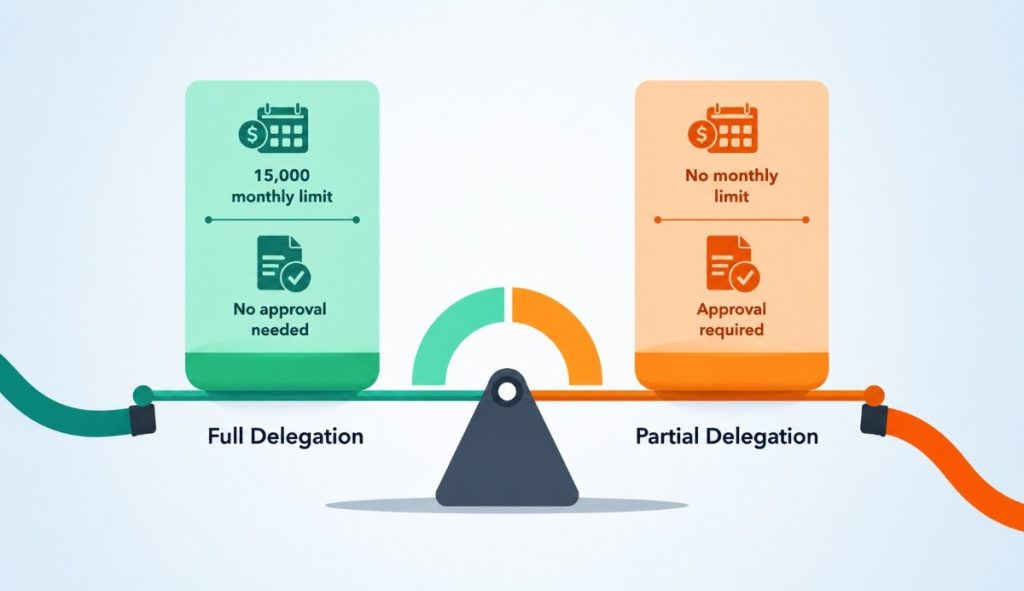
In full delegation, the secondary user can make payments within the assigned UPI Circle limit without asking for approval every time. Trusted users, such as family members, can use this feature with spending capped according to UPI Circle rules.
In partial delegation, the secondary user needs approval from the primary user before completing transactions. This gives tighter control over spending and is useful when you want to closely monitor each payment.
| Feature | Full Delegation | Partial Delegation |
|---|---|---|
| Payment Control | The secondary user can pay directly | The primary user must approve |
| Spending Freedom | Higher within a set limit | Restricted and monitored |
| Transaction Flow | Faster and independent | Approval-based |
| Best Use Case | Family members, trusted users | Controlled or cautious spending |
Daily, Monthly, and Per-Transaction Limits Under UPI Circle
UPI Circle transaction limits in 2026 are set under the framework of the National Payments Corporation of India and may vary slightly by bank or UPI app.
These limits control the amount users can spend through delegated payments.
| Limit Type | UPI Circle Limit (2026) |
|---|---|
| Per-Transaction | ₹5,000 (as per National Payments Corporation of India guidelines) |
| Daily Limit | Bank-defined within the NPCI framework |
| Monthly Limit | ₹15,000 (typical NPCI reference limit) |
If you want to understand how these delegated limits compare with standard UPI transfer caps, check our guide on UPI maximum transaction limits.
Which Transactions Are Allowed and Blocked Under UPI Circle?
UPI Circle is designed for controlled and safe spending, so not all types of UPI payments are allowed under delegated access.
The supported and restricted transactions depend on the rules set by the National Payments Corporation of India and the participating bank or app.
Allowed Transactions
- Merchant payments via UPI QR codes
- Grocery, utility, and everyday bill payments
- Small value retail purchases within the set limit
- Payments to supported merchants under the UPI network
Blocked / Restricted Transactions
- High-value transactions beyond UPI Circle limits
- Certain transfers require additional authentication
- Unsupported or restricted merchant categories (as per bank rules)
- Any transaction outside delegated permissions
Common UPI Circle Limit Issues and How to Fix Them
Users may face certain issues while using UPI Circle, especially when transactions hit limits or fail due to system settings.
Most users can fix these simple problems quickly by checking the app or bank settings.
1. Transaction failed due to the limit being reached
- Cause: Per-transaction, daily, or monthly limit has been exceeded.
- Fix: Wait for the limit to reset or reduce the transaction amount.
2. Payment not going through under UPI Circle
- Cause: UPI Circle is not active, or the setup is incomplete
- Fix: Check UPI Circle activation status in your UPI app and re-enable if needed
3. Approval or authorization failure
Cause: Primary user has not approved the transaction (in partial control cases).
- Fix: Request approval again or ensure notifications are enabled.
Problem 4: App or bank delay
- Cause: Temporary server or banking network issue
- Fix: Retry after some time or update your UPI app
Security and Safe Usage Tips for UPI Circle
UPI Circle involves delegated payment access, so maintaining security and spending control is very important for safe financial use.
Users should regularly monitor their activity and set limits correctly to avoid misuse or errors.
- Keep your UPI PIN and banking credentials private at all times
- Enable biometric lock or app security features for extra protection
- Regularly check transaction history to track spending
- Set appropriate spending limits for delegated users
- Review and update access permissions from time to time
- Remove or revoke access if it is no longer needed
Conclusion: UPI Circle Transaction Limit of ₹5,000 Per Transaction and ₹15,000 Monthly
UPI Circle allows delegated users to make payments within a capped structure of up to ₹5,000 per transaction and ₹15,000 per month, ensuring controlled and secure usage.
Banks design these limits to prevent overspending while allowing smooth day-to-day digital payments, with slight variations based on NPCI guidelines.
FAQs
UPI Circle allows up to ₹5,000 per transaction and ₹15,000 monthly under NPCI guidelines, depending on bank implementation rules.
Yes, banks may apply slightly different caps within NPCI’s framework, so actual limits can vary across UPI-enabled applications.
Payments usually fail when you exceed limits, lack approval in partial delegation, or face temporary banking or server issues.
It adds control by allowing delegated access with spending limits, reducing misuse risk while maintaining primary user oversight and monitoring.
It works for most QR-based merchant payments, but some restricted categories or high-risk transactions may not be supported.