

You can check your credit card balance in India by giving a missed call, sending an SMS, using your bank’s mobile app, net banking, or calling customer care.
Knowing your balance helps you avoid extra charges and manage your money better.
This guide shows you the easiest ways to check your balance, what the different numbers mean, and how to fix common problems.
How to Check Credit Card Balance – Fastest Methods
Here are five easy ways to check your credit card balance without going to the bank.
| Method | How Fast | Need Internet | Need Internet |
|---|---|---|---|
| Missed Call | Few seconds | No | Quick check |
| SMS | Under 1 minute | No | When no internet |
| Mobile App | Instant | Yes | See everything |
| Net Banking | Instant | Yes | Using computer |
| Customer Care | 2-3 minutes | No | Get more details |
All these methods work any time, day or night, from anywhere you are.
Method 1 – Missed Call (Works Without Internet)
Give a missed call to your bank’s number from your registered mobile number. The call will cut automatically.
You will get an SMS in a few seconds showing how much you owe and how much you can still spend.
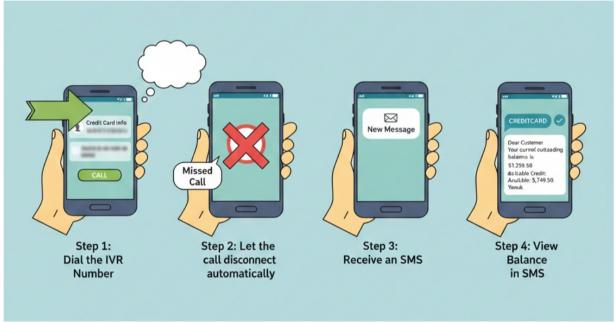
This is the fastest way because it takes less than 30 seconds. It works even when you have no internet or a poor network.
For example, if you have an SBI bank account, give a missed call on +919223766666 and check the balance from the message they’ll send you.
Method 2 – SMS Balance Check
Send an SMS to your bank’s number. Type BAL (space) last 4 digits of your card. For example, if your card ends in 1234, type: BAL 1234.
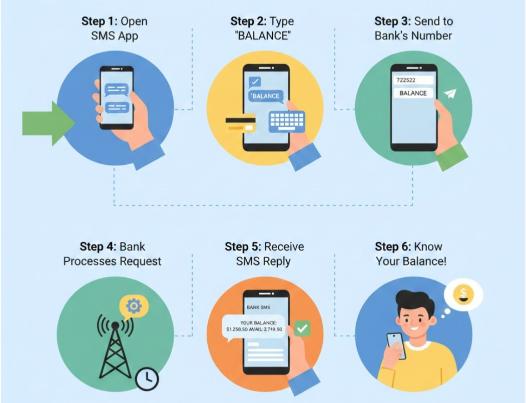
This is helpful when you want to save the message and check it later. It works when you can send texts but have no internet.
For example, for Axis Bank, message to 56161600, and for Kotak, message to 5676788, this way you’ll get to keep the message as long as you want.
Method 3 – Mobile Banking App
Open your bank’s app on your phone. Log in with your password or fingerprint. Go to the credit cards section.
Tap your card to see everything – how much you owe, how much you can spend, when to pay, and your recent purchases.
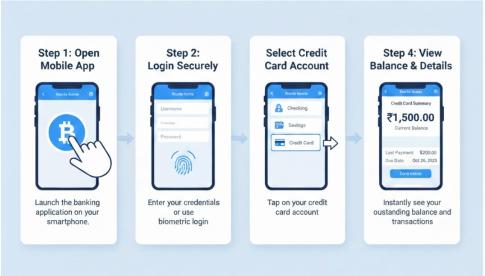
The app shows live updates. Use this when you want to see all details about your card, not just the balance.
There are many apps in the market like CRED, BankBazaar, OneScore, and dedicated mobile banking apps like iMobile, SBI card that let you check your credit card balance and other details as well.
This method is more reliable and consistent than SMS and missed calls, as banks keep changing their service numbers.
Method 4 – Net Banking
Go to your bank’s website on a computer. Log in with your username and password.
Click on credit cards. You will see your complete card details, including balance, spending limit, and all transactions.
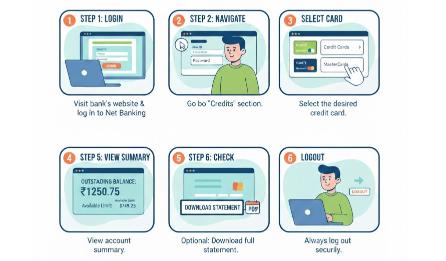
This works well when you are on a computer and want to see your full statement or download it.
Method 5 – Customer Care IVR
Call your bank’s helpline number. Listen to the voice menu. Press the number for credit card services. Then press the number for the balance check. You may need to enter your card number.
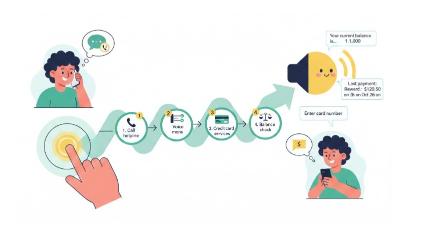
The voice system guides you step by step. It can tell you extra things like reward points and last payment details. Understanding if you can use a credit card at an ATM is important if you are not able to use any other method to check your balance or to withdraw cash, so that you won’t be stuck in an emergency.
Bank-Wise Missed Call & SMS Balance Check
Here are sms format and numbers of major Indian banks for sms and missed call purposes:
| Bank | Missed Call Number | SMS Format | SMS Number |
|---|---|---|---|
| SBI | 919223766666 | BAL XXXX | 5676791 |
| HDFC | 18001600 / 18002600 | BAL XXXX | 5676712 |
| ICICI | 9594612612 | IBAL XXXX | 9215676766 |
| Axis | +919951860002 | BAL XXXX | 56161600 |
| Kotak | 1800 274 0110 | BAL XXXX | 5676788 |
Note: XXXX means the last 4 digits of your card. Use your registered mobile number only.
While missed calls are free, standard SMS charges (or premium charges for shortcodes like 56767) may apply depending on your mobile plan.
How to Check Credit Card Balance on Mobile App?
Checking the balance on the mobile app is easy and shows you everything about your card.
Step 1: First, open your bank’s app. Enter your customer ID and card number. Create a PIN or use your fingerprint to log in later.
Step 2: Look for the credit cards section on the main screen. It might be under “Cards” or “My Accounts.” Tap on your card.
Step 3: Now you can see all the important details.
At the top is your outstanding balance – this is what you owe.
Below that is your available credit limit – this is how much more you can spend.
You also see your payment due date and the minimum amount you must pay.
| Term | What It Means | Why It Matters |
|---|---|---|
| Outstanding Balance | Total money you owe | You must pay this back |
| Available Limit | Money left to spend | Shows how much you can use |
| Minimum Due | Smallest payment allowed | Pay this to avoid late fee |
| Total Amount Due | Full bill amount | Pay this to avoid extra charges |
Knowing these terms helps you use your card better. The outstanding balance is all your purchases plus any fees.
The available limit goes down when you buy things and goes up when you pay the amount back.
Minimum due is usually 5% of what you owe, but paying only this means you pay high interest on the rest. Total amount due is what you should pay every month to avoid interest.
Official Apps and Portals (2026)
| Bank | Mobile App Name | Notes |
|---|---|---|
| SBI | SBI Card (for Credit Cards) | Use “SBI Card” app for specific credit card management. |
| HDFC | HDFC Bank MobileBanking | “MyCards” is also available as a web-app for credit cards. |
| ICICI | iMobile Pay | iMobile Pay is considered one of the highest-rated all-in-one apps. |
| Axis | Axis Mobile | “Open by Axis Bank” is the redesigned 2026 interface. |
| Kotak | Kotak Bank: 811 & Mobile | The 811 app includes a “Smart Card Wallet” for credit cards |
The app updates in real time, so the balance is always current. You can check as many times as you want for free. You can also set reminders for payments and block your card if you lose it.
People might still be confused about the differences between a credit card and a debit card; it is necessary that you are aware of the differences, as both do work in the same way.
How to Check Balance When the Card Is Blocked or the App Is Not Working?
If your card is blocked or the app is not working, you can still check your balance.
Call your bank’s customer care and talk to someone. They will ask your name, birth date, and mobile number to confirm it’s you. They will tell you your balance and other details.
You can also go to any bank branch with your ID card. The staff will help you check your balance and fix any card problems.
Another way is to check your email. Banks send monthly statements to your email. These show your balance, though they may not include very recent purchases.
Why Your Credit Card Balance Is Not Updating
Sometimes your balance does not show new purchases right away. Here’s why.
1. Pending transactions take time to show up. When you buy something, it first shows as pending. It takes 1 to 3 days for the shop to process it.
2. Delays on holidays happen on weekends and bank holidays. If you buy something on Saturday, it may only show on Monday or Tuesday. Purchases from other countries can take up to 5 days.
3. EMI conversion can be confusing. When you convert a purchase to EMI, the system first takes the full amount, then returns most of it and keeps only the monthly payment. This takes a few days.
If your balance has not updated for more than 5 days, call your bank to check if something is wrong.
Related read:
Conclusion: Check Your Credit Card Balance Via SMS, IVR, App Or Bank Portal
Check your credit card balance often to manage your money well. The quickest ways are missed calls and SMS, which work without internet and are instant. For complete details, use the mobile app or website.
Use the mobile app for the easiest experience. It shows live updates and lets you pay bills instantly. Set reminders so you never forget to pay. Always try to pay the full amount to avoid high interest charges.
Make it a habit to check your balance every week. This stops you from spending too much, missing payment dates, and paying extra fees. When you know your balance, you can plan better and avoid problems.
FAQs
Give a missed call to your bank’s number, send an SMS with your card details, open your bank’s mobile app, log into net banking on a computer, visit an ATM, or call customer care. All these ways are free and work anytime from your registered mobile number.
Many ways exist to check your balance. You can use mobile apps, websites, WhatsApp banking, missed calls, SMS, ATMs, bank branches, or customer care calls. Pick whatever is easiest for you, depending on whether you have internet or not.
Open your bank’s app or website. Log in with your username and password. Go to the credit cards section. Click on your card. You will see your balance, spending limit, payment date, and all purchases. Both app and website show live updates.
Send an SMS from your registered mobile number. Type BAL (space) last 4 digits of your card number. Send it to your bank’s SMS number. You will get your balance details in a few seconds. Different banks use BAL or IBAL.
Outstanding balance is the total money you owe right now. Available balance is the money left that you can still spend. Available balance equals your credit limit minus what you owe and any pending purchases. Both numbers help you manage spending.
Check your monthly statement, mobile app, or website to see the minimum due. You can also call customer care or check the SMS your bank sends before the payment date. Minimum due is usually 5% of what you owe, but paying only this creates high interest.
SMS balance check is free from most banks. The bank does not charge you for sending balance messages from your registered number. But your mobile company may charge normal SMS rates based on your plan. Missed calls are completely free.
Your limit reduces when you buy things, have pending purchases, convert something to EMI, or have unpaid bills from before. It also goes down if you took cash from ATM or if your bank blocked some amount for safety. Check your recent purchases to know why.
Many banks now have WhatsApp services. Send a message to their official WhatsApp number. First register by sending your customer ID and OTP code. After that, just send “Balance” or “BAL” to get your card balance instantly on WhatsApp.