

You can check your Paytm wallet balance by opening the app and tapping “Balance & History” at the top right.
Due to RBI regulations from early 2024, you cannot “top up” or add money to your Paytm Wallet anymore. But you can still check, use, and withdraw any existing balance you already have.
This guide shows you all the easy ways to check your Paytm wallet balance. You will learn the fastest way, offline ways, and how to fix problems.
How To Check Paytm Wallet Balance: All Methods
Paytm gives you several ways to check your wallet balance. You can use the mobile app, send an SMS, give a missed call, or visit the website.
| No | Method | Time Needed | Internet Required | Best For |
|---|---|---|---|---|
| 1 | Paytm Mobile App | 5 seconds | Yes | Daily quick checks |
| 2 | Through SMS | 1-2 minutes | No | No internet access |
| 3 | Missed Call | 1-2 minutes | No | Network issues, no internet |
| 4 | Paytm Website | 10 seconds | Yes | Computer or laptop users |
Each method is simple and takes less than a minute. The app method is the fastest and shows your balance instantly.
How To Check Paytm Wallet Balance Using the Mobile App?
The mobile app is the quickest way to see your wallet balance. This method works the same way on both Android phones and iPhones. Here are the steps:
1. Open the Paytm app on your phone
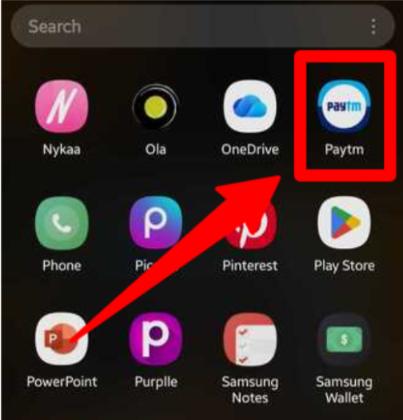
2. Look at the top right corner of your screen. Tap on “Balance & History”
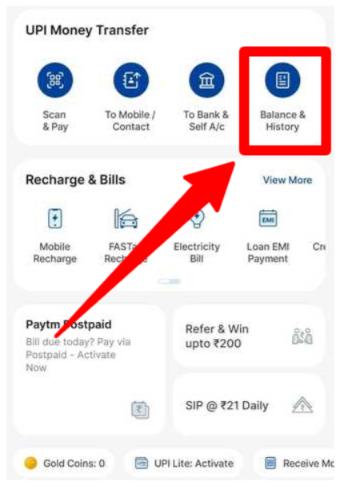
Note: If you already have money in your wallet, then you’ll directly see the wallet balance available there, there won’t be any wallet mentioned after the new update.
Whether you use Android or iPhone, the steps are the same. The app design is identical on both systems.

Note: You might also see your wallet balance directly on the main screen without clicking anything. The app shows a quick view of your balance right at the top.
How To Check Paytm Wallet Balance Without App (SMS & Missed Call)
What if you do not have internet or cannot open the app? No problem. Paytm offers offline methods to check your balance.
These work without any data connection. You only need your phone and the registered mobile number.
Paytm Wallet Balance Check by SMS
You can check your wallet balance through a simple text message. This is very useful when you have no internet.
Steps:
- Open your phone’s message app
- Type BAL
- Send it to 09880001234
- Wait for the reply SMS
You will get a message showing your complete balance within a few seconds. The SMS will show wallet balance, FASTag balance, and gift voucher balance separately.
For example: “Your Paytm Balance is Rs. 450. Wallet: Rs. 300, FASTag: Rs. 150.”
Paytm Wallet Balance Check by Missed Call
The missed call method is even easier than SMS. You just dial a number from your registered mobile.
- Missed Call Number: Dial 8860058048 from your registered Paytm mobile number.
- How It Works: The call will disconnect automatically after 1-2 rings. You do not need to speak to anyone. Within 1-2 minutes, you will receive an SMS with your complete balance details.
- Time to Receive SMS: The balance SMS usually arrives within 1-2 minutes after the missed call disconnects.
How To Check Paytm Wallet Balance Using Website (Laptop / Browser)
You can also check your wallet balance from any computer or laptop browser. This is helpful when you are working on a computer.
Steps to Check:
- Open any web browser
- Go to Paytm.com
- Click on “Sign In” at the top
- Enter your mobile number and password
- After logging in, click on “Passbook” in the menu
- Your wallet balance will be displayed on the screen
The website shows the same information as the mobile app. You can see your complete transaction history and wallet balance.
Choose the method that works best for you. The mobile app is perfect for everyday use.
SMS and missed calls work great when you have no internet. The website is helpful when you are using a computer or a laptop.
Where Exactly Is Wallet Balance Shown in Paytm App?
Many people get confused between different balance types in Paytm.
The wallet balance is shown in the top right corner under “Balance & History.” When you tap it, you see different options like Wallet, Bank Balance, and Postpaid.
Difference Between Wallet and Bank Balance:
- Wallet Balance: This is money stored in your Paytm Payments Bank wallet. You can use it directly for payments without entering PIN.
- Bank Balance: This shows money in your linked bank accounts. You need to enter your UPI PIN to use this money.
Important Note: Since March 2024, the Paytm Payments Bank wallet has restrictions. You cannot add new money to the wallet or do wallet-to-bank transactions, but you can still use any existing balance.
The Paytm app still works perfectly fine for UPI payments using your linked bank accounts.
Paytm Wallet Balance Not Showing? Fix It Instantly
Sometimes you might face problems seeing your balance. Here are common issues and quick fixes.
| Issue | Fix |
|---|---|
| Shows ₹0 | Complete your KYC verification through the app |
| Wallet option missing | Update the Paytm app from the Play Store or App Store |
| Payment fails | Check the internet connection and restart the app |
| Balance not updating | Pull down the screen to refresh, or log out and log in again |
| App crashes | Clear app cache from phone settings |
Check out UPI Payment New Rules and get a clear idea of how digital payment things are working in 2026.
Conclusion: Check Your Paytm Wallet Balance Via Paytm App Or Website
You can check your Paytm wallet balance through the website and app when the internet is available.
SMS and missed call options are useful when you are out of internet range. All of this is valid if you already have a Paytm wallet balance since before 2024.
You cannot add more money to it anymore. Save the numbers and codes from this guide in case of emergencies.
FAQs
The Paytm app continues to work normally for all UPI payments, bill payments, and recharges. The wallet has restrictions since March 2024, meaning you cannot add new money to the Paytm Payments Bank wallet.
Open the Paytm app and tap “Balance & History.” Then tap the three dots in the top right corner and select “Download UPI Statement.” Choose your date range or select an entire financial year. Once ready, download the file directly to your phone.
Paytm wallet is money stored in your Paytm Payments Bank account. Paytm UPI is a payment method that uses money from your linked bank accounts. When you pay through UPI, money comes from your bank, not your wallet.
You can spend wallet balance at any store with a Paytm QR code. Simply scan the QR and select wallet as payment method. You can also use it for bill payments, mobile recharges, and shopping on apps that accept Paytm wallet.
Open your Paytm app and look at the top right corner. Tap on “Balance & History.” You will see options including Wallet, Bank accounts, and Postpaid. Tap on “Wallet” to see your Paytm wallet balance.
You can transfer money from Paytm wallet to your bank account. Open the app, go to “Bank” tab, and tap “Transfer to Bank.” Enter the amount and select your bank account.