

Adding money to your Uber account is simple and takes a few taps in the Uber app. You can add funds using a credit card, debit card, UPI, or gift cards, and the balance appears instantly in most cases.
Uber Cash is money saved in your Uber account that you use to pay for rides and food orders. Uber Wallet is now called Uber Cash, and you do everything through the Uber app.
Below is a step-by-step guide on how you can add money to your Uber wallet, and you will also find answers to related questions.
How to Add Money to Uber Wallet (Uber Cash)
Follow these steps to add money to the Uber wallet:
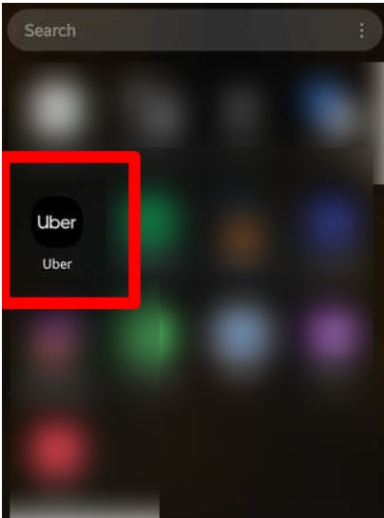
Step 1: Open the Uber app on your phone and log in.
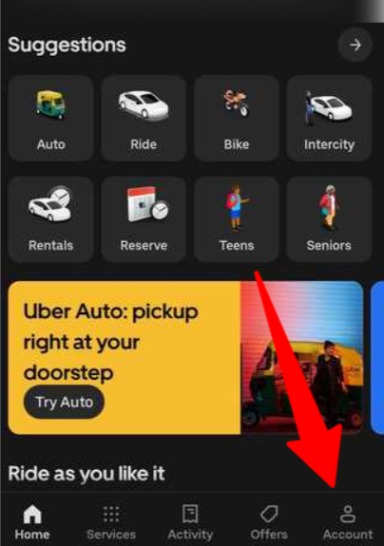
Step 2: Tap “Account” at the bottom right corner.
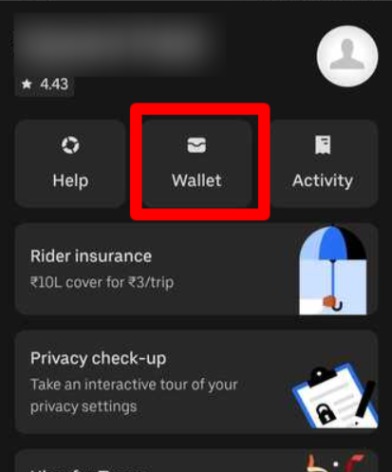
Step 3: Select “Wallet” or “Payment” from the menu.
Step 4: Tap on “Gift Card” and enter the gift code.
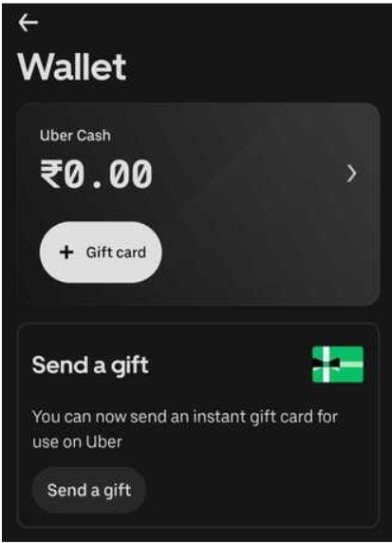
Note: If you are in India, then you can add money through gift cards only. Use other payment methods to complete transactions on Uber.
The balance is added instantly in most cases. You should see the money within seconds.
When you add money, it stays there until you spend it. This works in the Uber app for both Uber rides and Uber Eats.
Payment Other Than Uber Wallet
Different payment methods work in different countries. What you see depends on where you live.
Here are the payment methods:
- Credit card – Visa, Mastercard, and American Express
- Debit card – Most bank debit cards
- UPI – Available in India through Google Pay, PhonePe, and Paytm
- PayPal – Works in some countries
- Uber gift cards – Can be bought online or at stores
Disclaimer: Payment method availability depends on your country.
What Is Uber Wallet / Uber Cash?
Here is the main difference between Uber Wallet and Uber Cash:
| Feature | Uber Wallet | Uber Cash |
|---|---|---|
| Current name | Old term | Official current term |
| Used for | Rides & Eats | Rides, Eats, some subscriptions |
| Added by | User purchase | Purchase, gift cards, rewards |
| Expiry | No (purchased) | Promo credits may expire |
Uber Cash is money saved in your Uber account that you use to pay for rides and food. Think of it like a gift card inside the Uber app.
When you add money, it stays there until you spend it. Money you add never expires. Free credits from Uber often have end dates.
Uber Wallet Not Showing or Money Not Added – Fixes
Wallet option missing: Update your Uber app to the newest version. In some places, it shows under “Payment” instead of “Wallet.” Check if Uber Cash works in your country.
Payment taken but balance not added: Wait 5-10 minutes. Check your email for a receipt from Uber. Look at your bank statement. Contact Uber support through the app if the money doesn’t show up after an hour.
Uber Cash not visible: Restart the Uber app. Log out and log back in. Clear the app cache in your phone settings. Check Account → Wallet/Payment.
App outdated: Go to your app store. Search for Uber and check if an update is available. Install the newest version and restart your phone.
Related Read:
Conclusion: Add Money Through Wallet or Payment Menu
Open the app, go to Account, find Wallet or Payment, and add money. The balance shows up right away. Remember that you cannot withdraw this money from your wallet, so be mindful while adding money.
Check your Uber Cash balance before booking a ride or placing an order to avoid payment problems.
If you are facing an issue that is not listed here or the provided solution is not working, go to the help or support section in the app and contact customer support.
FAQ
Uber changed the name from Uber Wallet to Uber Cash, but the feature works exactly the same way. Both terms refer to the prepaid balance in your Uber account.
You can add money to Uber Cash in India using UPI, credit cards, debit cards, or gift cards. The feature is fully available and works just like in other countries.
You can put money into your Uber account by adding funds to Uber Cash. Go to Account, then Wallet or Payment, and choose Add Funds to load money from your payment method.
If you have a physical Uber gift card, open the app, go to Payment or Wallet, tap “Add Promo/Gift Code,” and enter the card’s code. The balance will be added to your Uber Cash immediately.
Load Uber Cash by opening the app, tapping Account, selecting Wallet or Payment, choosing Add Funds, picking an amount, and confirming with your payment method. The money appears in your account right away.
The minimum amount varies by country but is usually around $5 or ₹50. The app will show you the minimum and maximum amounts you can add when you try to load funds.
Uber Cash that you purchase does not expire. However, promotional credits that Uber gives you for free may have expiration dates