

You can delete a UPI ID by opening your payment app, going to the settings, selecting your bank account, and tapping the delete button next to the ID.
People delete their UPI IDs to stay safe, remove extra IDs they don’t need, or when they switch to a new bank.
This guide shows you how to delete single IDs, remove your complete UPI account, delete IDs when you don’t have your phone, manage closed bank accounts, and solve common issues.
Deleting UPI ID vs. Deregistering UPI ID
Before you delete your UPI ID, understand the difference between deleting UPI IPD and deregistering UPI ID to know what suits your situation:
| Feature | Deleting a UPI ID | Deregistering UPI Profile |
|---|---|---|
| Scope | This removes one ID or handle. | This removes all IDs and disconnects your banks. |
| Best For | Cleaning up extra IDs for one bank. | Stopping UPI completely or switching apps. |
| Reversibility | You can create it again easily. | You need to verify everything again with SMS. |
When you delete a UPI ID, you remove one payment address, like yourname@okaxis, which is the VPA in your UPI ID. When you deregister, you remove everything and disconnect all your banks from the app.
Deleting takes away just one handle. Deregistering clears your entire UPI setup from that app.
Most people just need to delete single IDs. You only need full deregistration when you stop using an app completely or face a security issue.
How to Delete UPI ID Online in UPI Apps (Direct Steps)
Each app looks a bit different, but the steps work the same way. Here is how to do it:
How to Delete UPI ID in Google Pay App?
Step 1: Open the Google Pay app

Step 2: Go to your profile on the top right corner

Step 3: Select the Bank Account option

Step 4: Choose the bank you want to work with

Step 5: Tap on “Manage UPI IDs”

Step 6: Click the 3 dots on which ID you want to remove and delete it.
GPay creates several IDs for each bank so your payments work smoothly. You can delete the extra IDs without any problem as long as you keep at least one.
This system helps your money go through even when one server is busy or down.
How to Delete UPI ID in PhonePe?
Step 1: Open the PhonePe app and go to your profile icon

Step 2: Go to the manage payments section

Step 3: Select the Bank Account option

Step 4: Select the bank account and you will see all your linked IDs like @ybl, @ibl, and @axl

Step 5: Tap the delete icon next to the ID you want to remove
PhonePe usually creates three IDs for each bank you add. You can remove the ones you don’t use, but you should keep at least one active so you can still send and receive money.
How to Delete UPI ID in Paytm?
Step 1: Open Paytm and tap on your profile icon
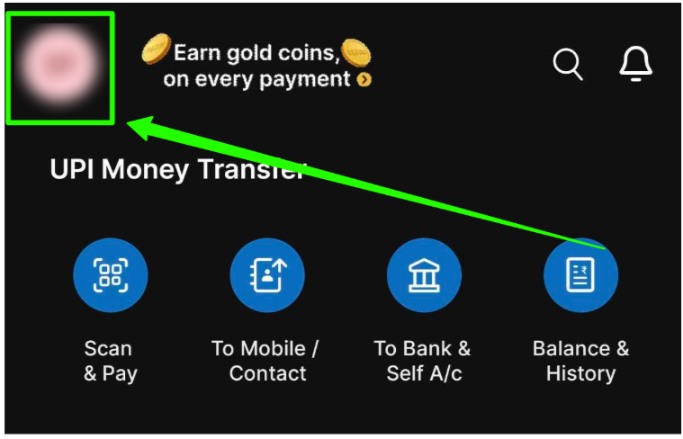
Step 2: Go to UPI & Payment Settings

Step 3: Select the view option besides UPI ID

Step 4: Tap on 3 dots after the ID you want to deactivate and “Remove” to delete the whole bank or “Edit” to delete specific IDs only

Paytm gives you two choices. You can remove the entire bank account or just delete certain IDs. Pick what works for you based on whether you still want to use that bank for payments.
How to Delete UPI ID Without the App?
If you lost your phone or think someone else can access it, you need to act right away.
Method 1: Use the USSD Code (99#)
- Dial *99# from your registered mobile number
- This method works even without the internet
- Follow the options that appear on your screen
- Select the option that disables your UPI services
Method 2: Call Your Bank Helpline
- Call the toll-free number of your bank
- Tell them you want to block UPI on your account
- Keep your account number ready because they will ask for it
Method 3: Use the NPCI Portal
- Visit the NPCI website on any browser
- Report any suspicious activity or fake IDs
- They can help you turn off any compromised UPI handles
If you lost your phone, you should block your SIM card first before doing anything else.
UPI works through your SIM card, so blocking the number stops anyone from using your UPI even if they know your app PIN. This is the fastest way you can protect your money.
How to Delete UPI ID When Switching Banks Or Closing Accounts?
When you close a bank account, the UPI ID does not disappear on its own. You need to remove the bank account from your app manually. This prevents failed payments when people try to send you money later.
| Scenario | What You Need to Do |
|---|---|
| Closing Bank Account | Remove the account from your app and delete the UPI ID. |
| Changing Mobile Number | Deregister UPI from your old number right away. |
| Lost SIM Card | Block your SIM first, then call the bank to freeze UPI. |
If you forget to remove closed accounts, other people can still see your old ID as active. They might send money that will bounce back after several hours, which creates problems for everyone.
Common Issues When Deleting A UPI ID
“Cannot Delete Primary ID”: Every app requires at least one working ID at all times. If you want to delete your main ID, you need to make another one your default first.
Go to your UPI settings, choose a different ID as your primary one, and then you can delete the old one.
Pending Transactions: When you delete an ID, it does not cancel any payment that is already processing.
You should wait for all pending payments to finish before you remove any IDs. If you delete the ID too soon, you might not know where your refund will arrive if something goes wrong.
Related Read:
Conclusion: Delete Through App Settings Or Emergency Channels
Delete or deregister your UPI ID according to your situation from your UPI app or call the emergency number to do the same.
Keeping your UPI IDs organized makes your payments safer and simpler. Taking care of your UPI IDs is part of staying safe with digital money. When you clean up regularly, you avoid confusion and reduce the chance of someone using an old ID you forgot about.
Always make sure your main ID is working before you delete the others, so your payments don’t fail.
FAQs
Open your payment app, go to the settings section, pick your bank account, and delete the specific ID. If you want to remove everything, you need to deregister UPI completely.
You cannot remove just your phone number because UPI needs it to work. If you want to disconnect completely, you need to deregister UPI from all apps or block the number through your bank.
You can delete your UPI ID in Paytm. Tap on your profile icon, go to UPI & Payment Settings, pick your bank account, and then edit or remove the ID you want.
You cannot delete your transaction history. Banks and NPCI keep these records because of legal rules. Some apps let you hide transactions from view, but the records stay in the system.
You can have multiple IDs for one bank account. Most apps allow this, and you can use different handles across different apps for the same account
You can permanently delete your GPay account. First, deregister all your bank accounts, and then delete the app from your phone.